
Mac mini M4 vs. ChatGPT Subscription: The Smartest Tech Investment You'll Make This Year
1. Introduction: Breaking Free from the Subscription Trap
The world of Artificial Intelligence is currently dominated by a simple, default path: rent access, don't own the tools. This "AI-as-a-service" model is convenient, but it quietly locks us into a cycle of perpetual payments, uncertain data privacy, and a complete lack of control. It’s a strategic decision by Big Tech, but it doesn’t have to be your strategy.
It starts with a familiar feeling—that little sigh you let out when you see the $20/month charge from ChatGPT Plus hit your bank account again. It’s just one more digital subscription in a sea of them, another small leak in the boat. But what if, instead of renting a key to someone else’s AI kingdom, you could build your own, right in your home? What if you could own the infrastructure, control the data, and say goodbye to recurring fees forever?
This isn’t about being cheap; it’s about being smart. Investing in a Mac mini M4 for a local AI server is not an expense. It is a savvy, long-term investment that offers superior value, privacy, and control compared to the endless treadmill of subscriptions. After the upfront cost, your ongoing expenses drop to near zero — just a few euros per year in electricity.
Apple Mac mini (2024, M4)
The value king. 16GB RAM is now standard, making this machine capable of handling serious local AI models.

But before we get into the tech, let's talk about the one thing everyone understands: the bottom line.
2. The Real Cost of "Convenience": A Financial Showdown
When you’re evaluating a tech purchase, looking at the monthly price is like judging an iceberg by its tip. The real metric is the Total Cost of Ownership (TCO), and that’s where the subscription model falls apart. Let's run a direct, no-nonsense financial comparison that cuts through the marketing to reveal the true long-term expense.
Cost Analysis: Subscription vs. Ownership
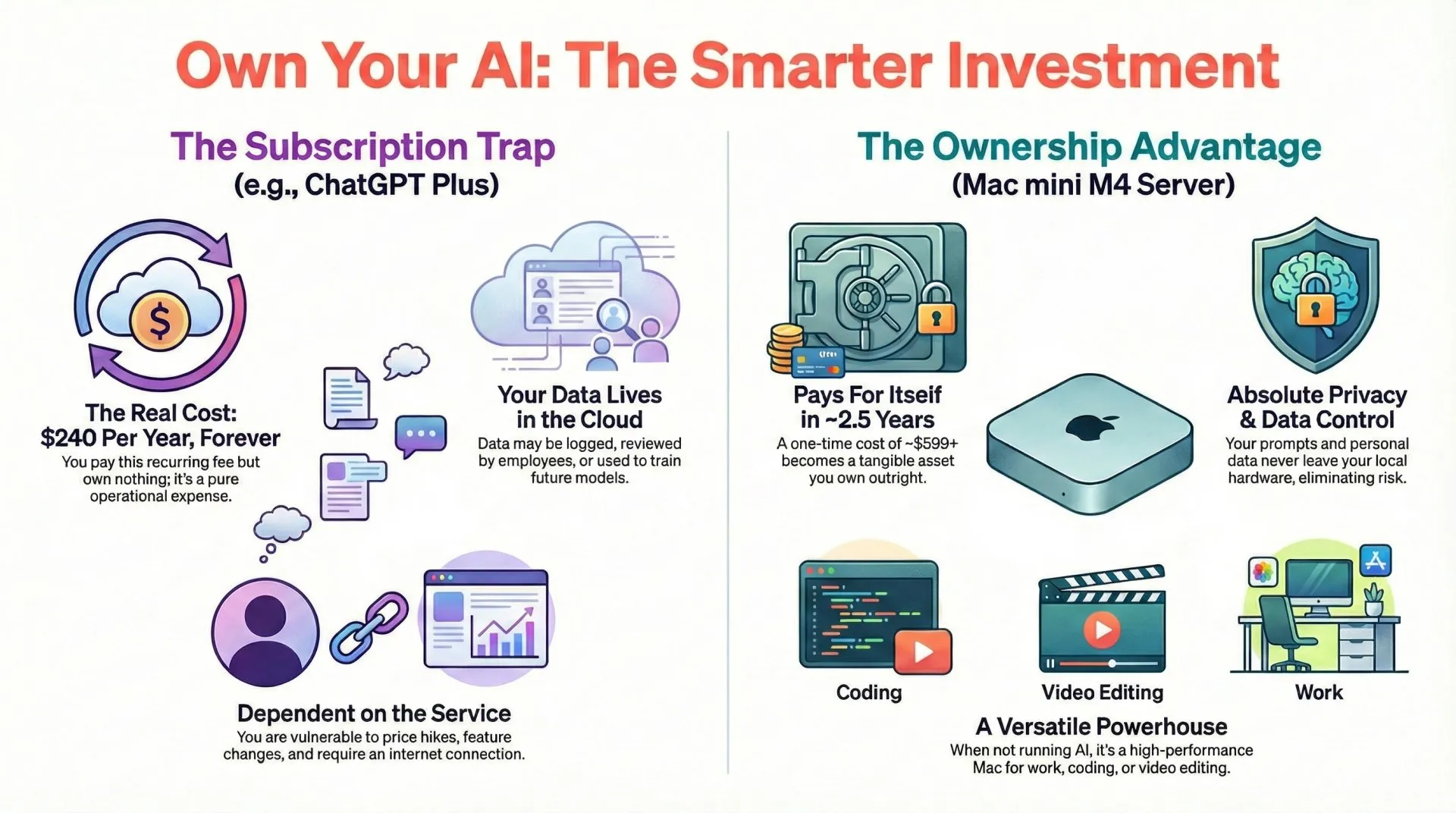
- The Subscription Trap: A ChatGPT Plus subscription costs $20 per month, which adds up to $240 per year. It's the digital equivalent of a gym membership you feel guilty about every month, except you get nothing tangible to show for it. You pay this forever, and at the end of every year, you own nothing. It's pure operational expense.
- The Ownership Power Move: A base model Mac mini M4 has a one-time cost of $599. It's a capital investment that becomes a tangible asset you own.
For the price of roughly 2.5 years of a ChatGPT Plus subscription, you can own the Mac mini outright. After that, your powerful, private AI server runs for effectively free, forever (minus minimal electricity costs).
And what about other cloud options? They don't fare much better. A cheap Virtual Private Server (VPS) might only cost $3-5/month, but it lacks the power for serious AI. If you turn to API-based models, moderate to heavy usage can quickly run up a bill of $10 to $150 per month in token costs, putting you right back in the same financial boat as a subscription, but with more complexity.
| Feature | ChatGPT Subscription | Local Mac mini AI |
|---|---|---|
| Upfront Cost | $0 | ~$599+ |
| Monthly Cost | $20 | ~$1 electricity |
| Privacy | Cloud processed | Fully local |
| Performance | State-of-the-art models | Smaller local models |
| Internet Required | Yes | No |
| Ownership | None | Full hardware ownership |
The numbers clearly favor ownership, but the financial argument is only the beginning. The real magic lies in what you're buying for that money.
3. The "Abo-Killer": Why the Mac mini M4 is the Perfect Local AI Server
The Mac mini isn't just another computer; it’s a purpose-built appliance for local AI, uniquely suited for the task thanks to a series of brilliant hardware decisions from Apple. It's the perfect "Abo-Killer"—a subscription-killing machine that punches far above its weight class.
- Unified Memory Architecture: This is the game-changer. On Apple Silicon, the CPU and GPU share one giant pool of high-speed memory. This lets you run massive AI models that would normally require a PC with an expensive, dedicated graphics card loaded with VRAM. It’s why a base model with 16GB of RAM can easily run powerful 8B models, a machine with 24GB can experiment with heavily quantized 30B-class models, and one with 48GB+ can run sophisticated 70B models—a feat unheard of in this price range.
- Incredible Power Efficiency: Unlike a gaming PC with a power-hungry GPU that can heat your office and inflate your electricity bill, the Mac mini sips power. It runs whisper-quiet, making it the perfect 24/7 home server that won't annoy you or show up on your utility bill.
- Built-in Metal Acceleration: Apple Silicon chips come with powerful, integrated GPU cores that accelerate AI tasks right out of the box using Apple's Metal framework. There are no complex drivers to install or CUDA dependencies to wrestle with. It just works, making high-performance AI accessible even if you're not a systems engineer.
- The 'Setup & Forget' Form Factor: The Mac mini is compact, unobtrusive, and designed to be tucked away. Its small size and silent operation make it an ideal home server that you can set up once and run "headless"—without a monitor, keyboard, or mouse—24 hours a day, 7 days a week.
These hardware specs aren't just impressive on paper; they translate into a powerful and responsive AI experience right on your desktop.
4. Beyond Theory: What Your Local AI Server Can Actually Do
Hardware specs are one thing, but the user experience is what truly matters. This isn't about running benchmarks for bragging rights; it's about the practical payoff. On a base Mac mini M4 running a capable model like Llama 3.1 8B, you can expect performance of 48-70 tokens per second. To put that in perspective, that's significantly faster than the average person can read. The result is a fluid, real-time conversational experience with none of the frustrating lag or latency you often get from cloud-based services.
Cloud models like ChatGPT still outperform local models in raw reasoning, multimodal features, and cutting-edge capabilities. A local server shines in privacy, control, and cost predictability — not in beating frontier AI at every task. However, for 90% of daily tasks, local models are surprisingly capable.
This setup unlocks a huge range of possibilities, turning your Mac mini into a private intelligence hub:
- Daily Productivity: Use it for general inquiries, proofreading documents, summarizing long articles, and getting coding assistance without ever sending your data to the cloud.
- Deep Mac Integration: Connect your local AI to powerful macOS productivity tools like Raycast, Alfred, and Shortcuts to create custom workflows that automate your life.
- A Private AI Agent: Run open-source agents like Moltbot (formerly Clawdbot) to create a tireless AI assistant that can find files on your computer, automate complex tasks, and respond to your commands from anywhere via your phone.
But the true value of this setup goes far beyond speed and convenience; it's about reclaiming control over your data and your digital tools.
5. The Definitive "Smart Spend": Ownership, Privacy, and Versatility
Choosing to own your AI hardware isn't just a purchase; it's a strategic decision about your digital sovereignty. It moves you from being a tenant in someone else's tech ecosystem to being a homeowner in your own. This brings three profound advantages that no subscription can ever offer.
- Absolute Privacy and Data Control: With a local server, your prompts, your documents, and your personal data never leave your hardware. This is a complete departure from cloud services, where your data may be logged, reviewed by employees, or used to train future models. Reputable providers offer strong privacy policies and enterprise options, but local AI removes the trust requirement entirely. By keeping it local, you eliminate the risk of data breaches and ensure your sensitive information remains truly private.
- True Ownership and Offline Access: When you own the hardware, you are immune to a company's whims. You don't have to worry about sudden price hikes, features being put behind a new paywall, or the entire service shutting down. Your AI server works entirely offline, ensuring it's always available, whether your internet is down or you're working on a plane.
- A Powerful Mac for Everything Else: Here’s the kicker. Unlike a subscription, which vanishes the moment you stop paying, the Mac mini is a versatile, high-performance computer. When you’re not running AI models, it’s a powerhouse for photography, video editing, development, or simply a fantastic desktop for everyday work. This multi-purpose utility dramatically increases its overall value and makes it one of the smartest tech investments you can make.
Convinced? The best part is that setting up your personal AI powerhouse is simpler than you think.
Imagine asking your AI to summarize your tax documents, plan a project, or help with code — knowing none of it ever leaves your house. That is the peace of mind you are buying.
6. Your "Setup & Forget" Gear Guide
The phrase "building a home server" can sound intimidating, but with the Mac mini, it’s remarkably straightforward. This isn't a complex, multi-day project. It's a simple, curated guide to the essential hardware for a reliable, headless AI server you can set up in an afternoon and then forget about.
1. The AI Server Core: Mac mini M4 (Base Model)
This is the heart of your setup and the ultimate 'Abo-Killer.' The base model is more than powerful enough to outperform cloud subscriptions for daily tasks. However, if you plan on experimenting with larger, more complex models, upgrading to 24GB of RAM is a wise investment that provides a significant jump in capability for a modest cost.
2. Essential LLM Storage: Samsung T7 Shield
This is a non-negotiable peripheral. Large Language Model (LLM) files are massive, with a single model often taking up 60-100GB of space. As you start experimenting with different models for coding, writing, and research, you can easily fill terabytes of storage. Don't skimp here.
Samsung T7 Shield 2TB
Fast, rugged USB-C storage. Essential for storing massive Large Language Models (LLMs) without filling your internal drive.
3. Initial Configuration: Keyboard & Trackpad
You only need these for the initial setup. The goal is to configure the Mac mini to run 'headless'—operating 24/7 without a monitor, keyboard, or mouse attached. Once it's up and running on your network, you can put these away and access it remotely from your main computer or laptop.
Apple Magic Keyboard with Touch ID
Useful for initial setup. Touch ID makes authentication instant.
4. The Headless Secret Sauce
To make your "headless" server truly reliable and accessible, there are two small but mighty accessories we recommend.
The GPU Enabler: HDMI Dummy Plug 4K When you run a Mac without a monitor, the GPU sometimes goes to sleep, leading to laggy performance when you remote in. This cheap little plug tricks the Mac into thinking a 4K display is attached, ensuring smooth, full-resolution remote desktop sessions every time.
HDMI Dummy Plug 4K
Required for headless setups. It tricks the Mac into enabling the GPU for smooth remote desktop performance.
The Expansion Hub: Satechi Mac Mini Hub The Mac mini is small, and sometimes that means limited ports. This stand not only raises the mini for better airflow but adds front-facing USB ports and SD card slots—perfect for quickly transferring data to your server without fumbling around the back.
Satechi Mac Mini M4 Hub & Stand
Adds front I/O and M.2 expansion, perfect for keeping your AI server cool and expandable.
With these components, you're not just buying products; you're building an asset that will serve you for years to come.
7. Conclusion: Your AI, Your Hardware, Your Rules
The choice is clearer than ever. For the same amount you’d spend renting AI access for a couple of years, you can own a private, powerful, and profoundly more versatile local AI solution. The Mac mini M4 Pro (or even the base M4) isn't just a better deal; it's a better model for how we should interact with the core technologies of our time.
Don't think of this as just buying a new computer. View it as a declaration of digital independence. It's a deliberate step away from the endless cycle of renting your tools and a firm move toward owning them. It's about building a digital workshop where you're in charge, your data is safe, and the only rules that matter are the ones you set yourself.
📌 FAQ – Common Questions
Disclaimer: This review and its visuals were created with the help of AI. Some links may be affiliate links – we may earn a commission if you make a purchase, at no extra cost to you.