
The Mac Mini: The Definitive "Best Buy" for Your Personal Clawdbot (OpenClaw) AI Assistant
1. Introduction: The Rise of the Personal AI Agent
We are witnessing the dawn of a new era in personal computing, marked by the arrival of powerful, locally-hosted AI agents. Tools like Clawdbot (also known as OpenClaw/Moltbot) represent a paradigm shift from simple chatbots to truly autonomous assistants. Clawdbot is not just a conversational interface; it is an agent that can execute complex tasks, manage your file system, and control your computer's operations, all through familiar chat platforms.
The Agent's Home: Mac mini M4
The perfect host for your digital employee. Silent, efficient, and powerful enough to run local AI models 24/7 without spiking your electric bill.

As this revolutionary technology moves from developer curiosity to practical tool, the question of its foundation becomes paramount. The central thesis of this guide is that the Apple Mac mini has emerged as the ideal, definitive "best buy" hardware platform for running a personal AI agent 24/7.
This guide provides a comprehensive analysis of why the Mac mini is the superior choice for Clawdbot. We will detail the optimal hardware configuration, explore the critical security considerations that make a dedicated machine non-negotiable, and outline the essential accessories for a perfect, headless setup.
2. Why the Mac Mini is the Premier Platform for Clawdbot
Choosing the right hardware for a 24/7 AI agent is a strategic decision balancing performance, cost, power, and security. While alternatives like a cheap VPS or a custom NVIDIA PC exist, the Mac mini occupies a unique sweet spot rooted in specific architectural and software advantages that directly benefit AI workloads.
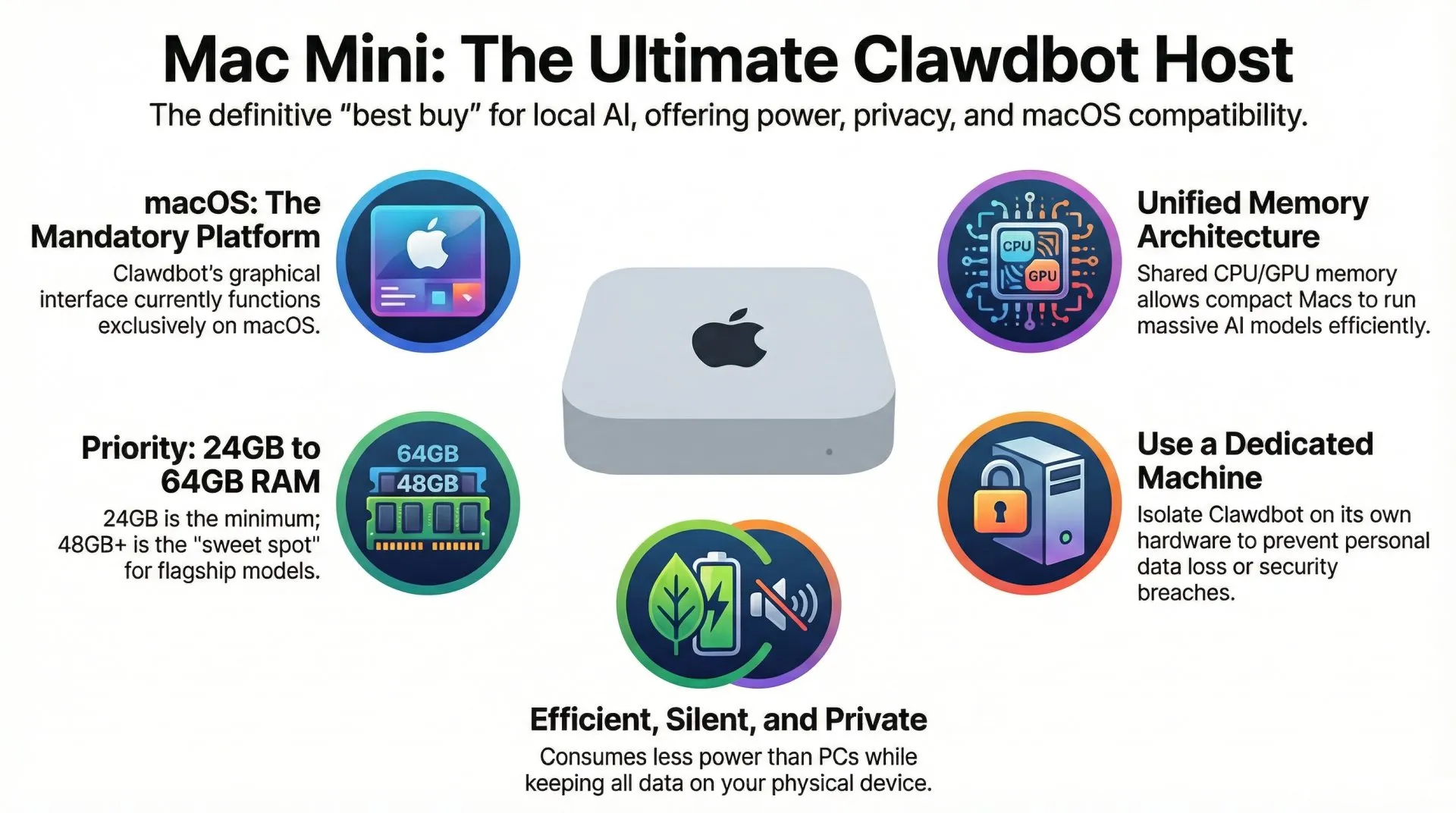
- The macOS Advantage: A primary, non-negotiable factor is that Clawdbot's graphical interface operations currently function only on macOS. This makes Apple hardware essential for deploying the full suite of the agent's capabilities, transforming it from a command-line tool into a versatile assistant that can interact with the full operating system.
- Unified Memory Architecture: Apple Silicon's unified memory is its single greatest architectural advantage for AI workloads, and the reason a 24GB machine can outperform PCs with far more raw RAM. Unlike traditional PCs with separate system RAM and dedicated GPU VRAM, Apple's M-series chips allow the CPU and GPU to share the entire memory pool. This means a Mac mini can dedicate a massive portion of its RAM to an AI model, making it feasible to run large, capable models on an affordable, compact machine.
- Power, Efficiency, and Silence: A dedicated AI assistant must run continuously. A custom PC built with a powerful NVIDIA GPU can easily consume hundreds of watts, generating enough heat and noise to warm an entire office. In stark contrast, the Mac mini is engineered for exceptional power efficiency. It sips power, runs silently, and its compact form factor allows it to function as a perfect, unobtrusive home server that you can set up and forget.
- Seamless Metal Acceleration: Running AI models on non-Apple hardware often involves a complex and frustrating setup process involving NVIDIA drivers, CUDA libraries, and environment configuration. Apple Silicon-based Macs, however, come with Metal GPU acceleration built-in. This powerful framework works out of the box with tools like Ollama and MLX, providing impressive performance without any of the setup complexity.
- Privacy and Physical Control: Running Clawdbot (OpenClaw) on a local Mac mini provides complete data sovereignty. Your files, prompts, and sensitive information never leave the physical device under your control. This is a crucial advantage over cloud-based APIs, which may log your data, or even VPS deployments, where your data resides on third-party infrastructure. For an assistant privy to your digital life, physical control is the ultimate privacy feature.
| Metric | Mac Mini | Cheap VPS | Custom NVIDIA PC |
|---|---|---|---|
| Upfront Cost | Moderate ($599+) | None | High ($1600+) |
| Monthly Cost | Minimal (electricity) | Low ($5-20) | High (Power Draw) |
| Performance | Excellent for its class | Limited (2-4GB RAM) | Very High |
| Privacy | Maximum (Physical Control) | Low (Third-Party) | Maximum (Local Control) |
| Ease of Use | High (Out-of-the-box) | Moderate | Low (Driver Hell) |
This unique combination of software compatibility, architectural efficiency, and practical design firmly establishes the Mac mini as the leading platform for Clawdbot, smoothly transitioning us to how to select the perfect model for your needs.
3. The Blueprint: Specifying Your Ideal Mac Mini Configuration
Selecting the correct Mac mini specifications is a critical, one-time decision. Because Apple Silicon Macs have their RAM and storage soldered to the motherboard, components cannot be upgraded after purchase. Choosing wisely from the start is paramount to ensure your machine can handle not only today's AI models but also the more powerful ones on the horizon. This section provides a clear, data-driven guide to making the right choice.
3.1. The RAM Imperative: Your Most Critical Decision
Random Access Memory (RAM) is the single most important factor when configuring your AI machine. The amount of RAM directly dictates the size and capability of the AI models you can run. macOS itself is memory-hungry, so the usable memory for a model is always less than the total system RAM.
- 16GB: Not Recommended. While seemingly adequate, a 16GB Mac provides only about 10GB of usable memory for models. This severely limits you to small, less capable models (e.g., 4-billion parameters) and is insufficient for serious use.
- 24GB: The Absolute Minimum. This configuration provides approximately 18GB of usable memory. It opens the door to running more useful 24B to 30B parameter models, which are a significant step up in capability.
- 48GB-64GB: The Sweet Spot. This is the sweet spot for running flagship local models. The popular Llama 3.3 70B, for instance, explicitly requires a minimum of 48GB of RAM to run effectively. This tier represents the "best buy" for users who want to leverage top-tier local AI without compromise.
- 128GB+ (Mac Studio): This is the enthusiast tier. For those who want to run the largest available models with optimal performance, host the agent for multiple users, or future-proof their setup for years to come, the high-memory configurations of the Mac Studio are the ultimate choice.
The Sweet Spot: Mac mini M4 Pro (24GB+)
The ideal starting point for a serious AI agent. 24GB allows you to run models that are actually intelligent, rather than just basic chatbots.
3.2. Processor and Storage Insights
While RAM is the primary bottleneck, the processor—specifically the number of GPU cores in the M-series chip—directly impacts inference speed, measured in tokens per second (tok/s). Performance benchmarks show a significant leap in speed with more advanced chips; for example, an M3 Pro chip can achieve approximately 28 tok/s on an 8B model, whereas a base M1 chip hovers around 12 tok/s.
Do not underestimate storage needs. AI models are massive, with individual files often ranging from 60GB to 100GB. As one developer noted, "it takes a day of experimentation to use 2.5TB of storage in your model cache." Opting for a 512GB SSD is a false economy that will quickly become a bottleneck. We highly recommend adding fast external storage like the Samsung T7 Shield to handle this library.
Samsung T7 Shield 2TB
Essential fast storage for massive AI model weights.
3.3. Recommended Tiers for Your AI Assistant
| Tier | Recommended Configuration | Use Case / Capable Models |
|---|---|---|
| Tier 1 (Starter) | Mac mini with 24GB RAM, 1TB SSD | Experimenting with moderately sized models (up to 30B). |
| Tier 2 (Best Buy) | Mac mini M4 Pro, 48GB-64GB RAM | Running powerful 70B models with excellent performance. |
| Tier 3 (Enthusiast) | Mac Studio Ultra, 128GB+ RAM | Maximum performance, hosting multiple users, future-proofing. |
Equipping yourself with this powerful hardware is only the first step. To operate it safely, you must understand the security implications of running a fully autonomous AI agent.
4. The Operator's Manual: Security and Headless Setup
This is arguably the most important section of this guide. The revolutionary power of Clawdbot (OpenClaw) comes with proportional risk. The agent's ability to control your computer requires elevated system permissions, creating what its own documentation calls a "spicy" level of access. Running Clawdbot responsibly is non-negotiable, and the cornerstone of that responsibility is isolating it on a dedicated machine.
4.1. The Cornerstone of Security: A Dedicated Machine
The security consensus is clear: deploying Clawdbot on a machine containing personal data is an invitation for disaster. As user reports of accidentally deleted photo libraries and security researchers' successful prompt injection attacks demonstrate, the risk is not theoretical. The primary threats are clear:
- Prompt Injection: A malicious actor could craft an email that tricks the agent into reading your configuration file and exfiltrating sensitive API keys.
- Data Loss: Because the agent has read/write access to your file system, a misunderstood command can have catastrophic consequences.
- Supply Chain Attacks: Installing a malicious "SKILL" could grant an attacker a persistent foothold on your system.
Deploying Clawdbot on your primary, personal computer is an unacceptable risk. A dedicated Mac mini provides the perfect, air-gapped solution, isolating these risks to a machine that contains no sensitive personal data.
4.2. Configuring Your Headless Server
Once your dedicated Mac mini is ready, the next step is to configure it for "headless" operation—running 24/7 without a dedicated monitor, keyboard, or mouse. This turns it into a true, remote-access AI server.
- Configure Energy Settings: Navigate to System Settings > Energy Saver. Ensure that "Prevent automatic sleeping when the display is off" and "Start up automatically after a power failure" are both enabled.
- Enable Remote Access: In System Settings > General > Sharing, turn on "Screen Sharing" and "File Sharing."
- Grant Full Disk Access: For Clawdbot to operate reliably, its underlying terminal application must be granted "Full Disk Access" in System Settings > Privacy & Security.
With the machine properly configured for secure, continuous operation, we can now turn to the few accessories that complete the headless setup.
5. Essential Accessories for a Headless Mac Mini
While the Mac mini is a wonderfully self-contained unit, a few key accessories are essential for creating a smooth, reliable headless experience.
5.1. The Headless Display Dilemma
Without a monitor attached, macOS may not fully engage the GPU, which can degrade performance. There are several ways to solve this.
- HDMI Dummy Plug: While software solutions exist, the HDMI dummy plug is the superior choice for a dedicated server. It is a simple, cheap, and fail-proof hardware solution. It tricks the Mac into believing a high-resolution 4K display is connected, ensuring the GPU is always active and available for maximum performance.
- Virtual Display Software: Applications like BetterDisplay can create a virtual monitor entirely in software.
- The Evolving "No Dongle" Reality: Newer Apple Silicon chips are improving headless operation, but a dummy plug is often still required to enable higher, non-standard resolutions for remote access.
HDMI Dummy Plug 4K
Critical for stable 24/7 headless server operation.
5.2. Remote Control and Interaction
With no physical keyboard or mouse, you will need a way to control your headless server. The most common methods are:
- Screen Sharing: Apple's built-in VNC client is the most straightforward way to see and control the Mac mini's desktop.
- Jump Desktop: For higher performance and more robust features, third-party applications like Jump Desktop are a popular choice.
- iPad with Sidecar: For a portable and high-quality experience, you can use an iPad as a wireless, native display for the Mac mini.
6. Final Verdict: The Unmatched Choice for Local AI
The Apple Mac mini stands alone as the definitive "best buy" for a dedicated Clawdbot (OpenClaw) server. Its unique combination of a massive unified memory pool, industry-leading power efficiency, out-of-the-box Metal GPU acceleration, and a silent, compact form factor creates a package that no other platform can match in terms of value, performance, and practicality. While alternatives exist, they each come with significant trade-offs in cost, complexity, privacy, or power consumption.
For any user serious about harnessing the transformative power of a personal AI assistant—while maintaining absolute privacy and physical control over their data—the Mac mini is not just a good choice; it is the definitive one.
The Mac mini is the definitive hardware for running a personal Clawdbot (OpenClaw) agent. Its power efficiency, unified memory, and macOS compatibility make it superior to any DIY PC or cloud VPS for this specific task.
📌 FAQ – Common Questions
Disclaimer: This review and its visuals were created with the help of AI. Some links may be affiliate links – we may earn a commission if you make a purchase, at no extra cost to you.